Five memories in Claude Code (2 hidden)
Claude Code remembers you in five separate places, and they load on completely
different terms. /memory shows you two of them.
The third is a directory of markdown files you have probably never opened. The fourth is every session you have ever run, sitting on disk in full. The fifth is free, unlimited, and loads none of the time. We’ll get to that one.
What people assume. You run /memory, get two CLAUDE.md files, and
reasonably conclude that’s everything.
What’s actually true. Three of the five tiers never pass through that command, and the one that does the most damage isn’t a memory system at all.
3 Claude Memory Tiers
These three arrive on their own. You write to them, and Claude turns up already holding what’s in them.
| Tier | Where | Loaded | Written by |
|---|---|---|---|
| User memory | ~/.claude/CLAUDE.md | in full, everywhere | you |
| Project memory | ./CLAUDE.md | in full, in this repo | you |
| Auto memory | ~/.claude/projects/<encoded-path>/memory/ | index only | Claude |
Auto memory is scoped per project — the directory name is the project path with its slashes hyphenated. Here is the whole of it for the repo this site is built from:
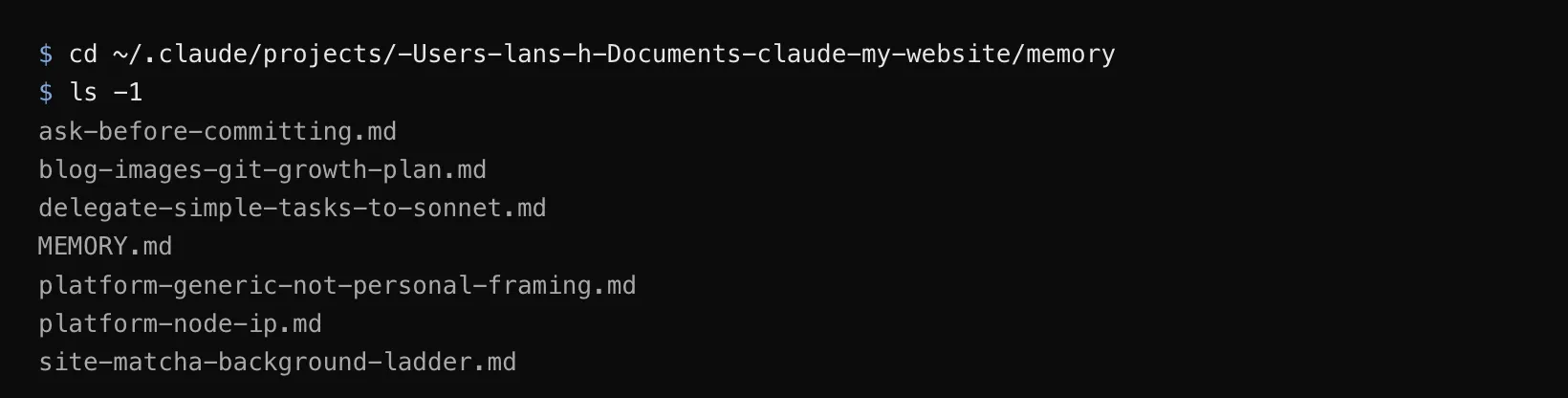
Six facts and an index, 8.5KB the lot, and only the index loads; Claude opens an individual file when the summary line looks relevant. The name is mine, by the way, not a label you’ll find in a menu.
2 Hidden Memories
The other two are just as real and just as full of your work. Neither one shows up unless you go and get it.
| Tier | Where | Loaded | Written by |
|---|---|---|---|
| Session history | ~/.claude/projects/<encoded-path>/*.jsonl | claude --resume | Claude |
| Hidden memory | every other doc you wrote | never | you |
One takes a command. The other takes you remembering it exists, which is the harder of the two.
Session history: the memory you already have
Every session you have run is on disk as a transcript, in the same per-project
directory as auto memory. claude --resume lists them and puts one back:
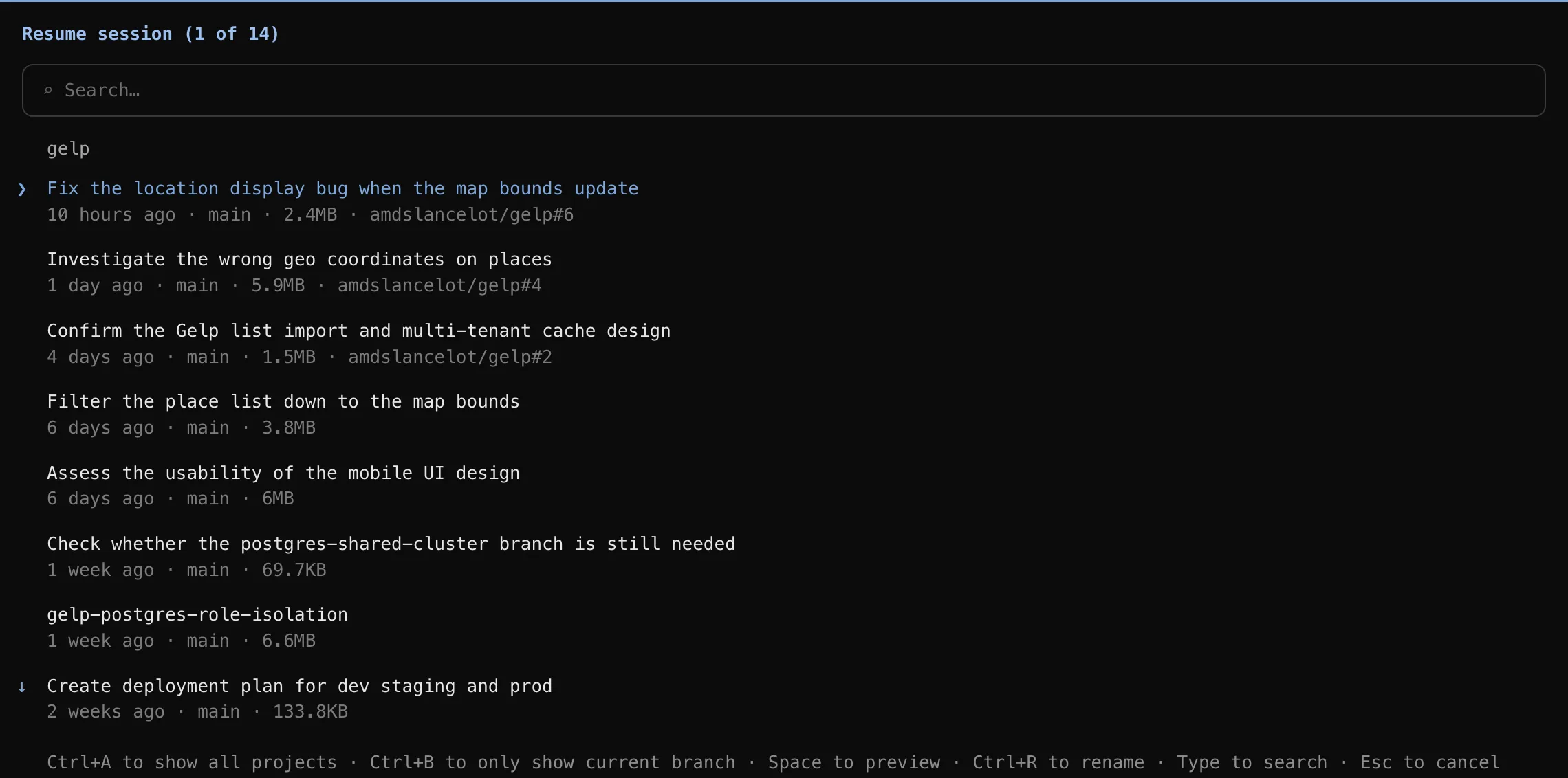
Titles are generated, so browsing is genuinely readable. Pick one and you land back in the conversation exactly where you left it — the plan, the file it was halfway through, the two approaches you’d already ruled out. Nothing needs to be written down for this to work, which is what makes it the easiest tier to use: you don’t have to have anticipated needing it.
The catch is the size column. Those numbers — 2.4MB, 5.9MB, 6MB — are transcripts, and resuming pours the whole thing back into context. Everything you do next pays for it, and auto-compact then fires wherever it happens to fire, usually mid-task.
Tip — Run
/compactwhen you resume a large session, before you start working. It condenses the old conversation to a summary and puts the boundary where you chose it instead of where the context limit chose it.
Worth resuming when the thread still has state you’d have to rebuild. A fresh session is cheaper for anything unrelated — resuming a 6MB transcript to ask a one-line question is the expensive way to ask a one-line question.
Hidden memory is the one that gets you
Your runbooks, your READMEs, your architecture notes. In the repo, obvious names, and they feel like something Claude has. They’re memory in the same sense that a locked filing cabinet is.
Which brings us to the free unlimited memory. People want to know how to give Claude more RAM, and there’s a trick: write a markdown file. Put it in the repo, give it an obvious name, and you have expanded Claude’s memory by exactly zero bytes until something happens to make it look.
Using it anyway
Say “check the deploy runbook” and Claude reads it and gets it right. Retrieval is almost never the failure — the failure is nobody remembering the file exists. Hidden memory does work as long-term memory. It just needs a human holding the index, and the human is you.
That’s the catch: you supply the keyword unprompted, which is the one thing memory is supposed to spare you. And naming the file only gets you the file — I once had Claude read a runbook end to end and still not reach the server, because the address was never written in it.
Where to put a given thing
- A rule you want followed everywhere → user memory. It arrives as an instruction that overrides default behaviour, which beats a remembered fact.
- A rule scoped to one repo → project memory. Same force, travels with git.
- A fact worth recalling that isn’t a rule → auto memory.
- Work you’ll pick up again tomorrow → nowhere. Leave it in the session and resume it.
- Anything for humans → an ordinary doc, and say its name out loud when you want it read.
Tip — Both
CLAUDE.mdtiers spend context every session, forever. Keep them to what applies every time; auto memory costs one line until the fact is needed.
When it breaks
- You switch machines. Auto memory and session history both live under your
home directory, not the repo — a fresh clone starts blank, and yesterday’s
sessions don’t follow you. Both
CLAUDE.mdtiers travel with git. - Entries go stale. Claude writes auto memory, so a note can name a file that no longer exists, and you find out when one gets used.
- You resume the wrong session. The titles are summaries, not indexes. Two sessions on the same branch can read identically from the list.
Open the auto-memory directory and read it. Plain markdown, yours to edit or delete, and almost certainly shorter than you expect. The transcripts sit in the same place, and they’re the part you’ve been re-typing every morning.
Lans Hung